Mobile application for drivers to manage routes and tasks
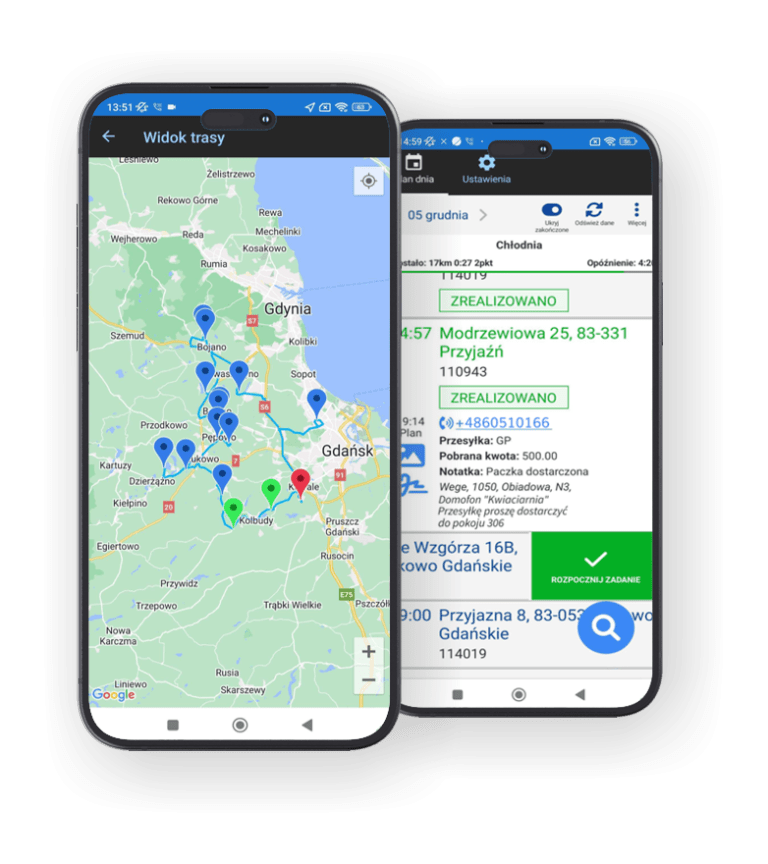
Simplify daily work on the road with the Routimo mobile application. The driver gains a clear daily plan, access to delivery details, routes, and tasks – all on their smartphone. Thanks to system synchronization, the schedule updates in real-time.
The application supports drivers in executing routes planned in the transport management system and facilitates performing tasks in the field.
Download the mobile app – available on Android and iOS
Always up-to-date task plan in Routimo for the driver
Thanks to Routimo, the driver always has access to their current route and task plan.
All information about destinations, delivery times, and completion status is automatically sent from the system to the application.
This eliminates the need for calls, SMS messages, or paper lists.
Task information – customer contact number, package number, comment, time window, priority, task progress, photos
Future tasks
quick preview of tasks for upcoming days
Messages
Company messenger – quick contact with the dispatcher
Transshipments
Organization of transshipment processes
Multi-day routes
Routes covering multiple days.
Truck maps
Access to maps adapted for trucks and large vehicles.
Fast and clear communication with drivers on the road
Efficient communication within an organization is fundamental to proper task execution and customer service. With the Routimo mobile application, drivers remain in constant contact with headquarters – they receive task comments, company announcements, and push notifications.
Information is sent automatically, which facilitates quick responses and reduces the need for phone calls.
Reporting and task statuses without paper and phone calls
The Routimo application supports effective task execution by the driver. On the road, they can mark a task as completed, add a photo, note, or signature, and headquarters receives this information in real-time.
This eliminates paper lists, phone calls, and communication errors – everything happens directly in the application.
Map
Regular, consistent, and timely informing customers about the status of their orders demonstrates a company's professionalism and builds trust.
Task completion
Confirmation of task completion or non-completion.
Comments
Adding a comment to a completed or uncompleted task.
Phone call
Making a quick phone call to the customer from the task view.
Cancel task
Removing a task from the daily plan from a mobile phone – e.g., when an employee receives information from a client about the impossibility of a visit.
Photos
Attaching photos to a task as proof of delivery, order completion, or non-completion.